Turn the CCTV you already have into an always-on safety and efficiency assistant
Your cameras already see everything. Eyenalytics makes them alert you when something needs attention: by light or buzzer, PLC signal, dashboard and daily report. All processed inside your factory.
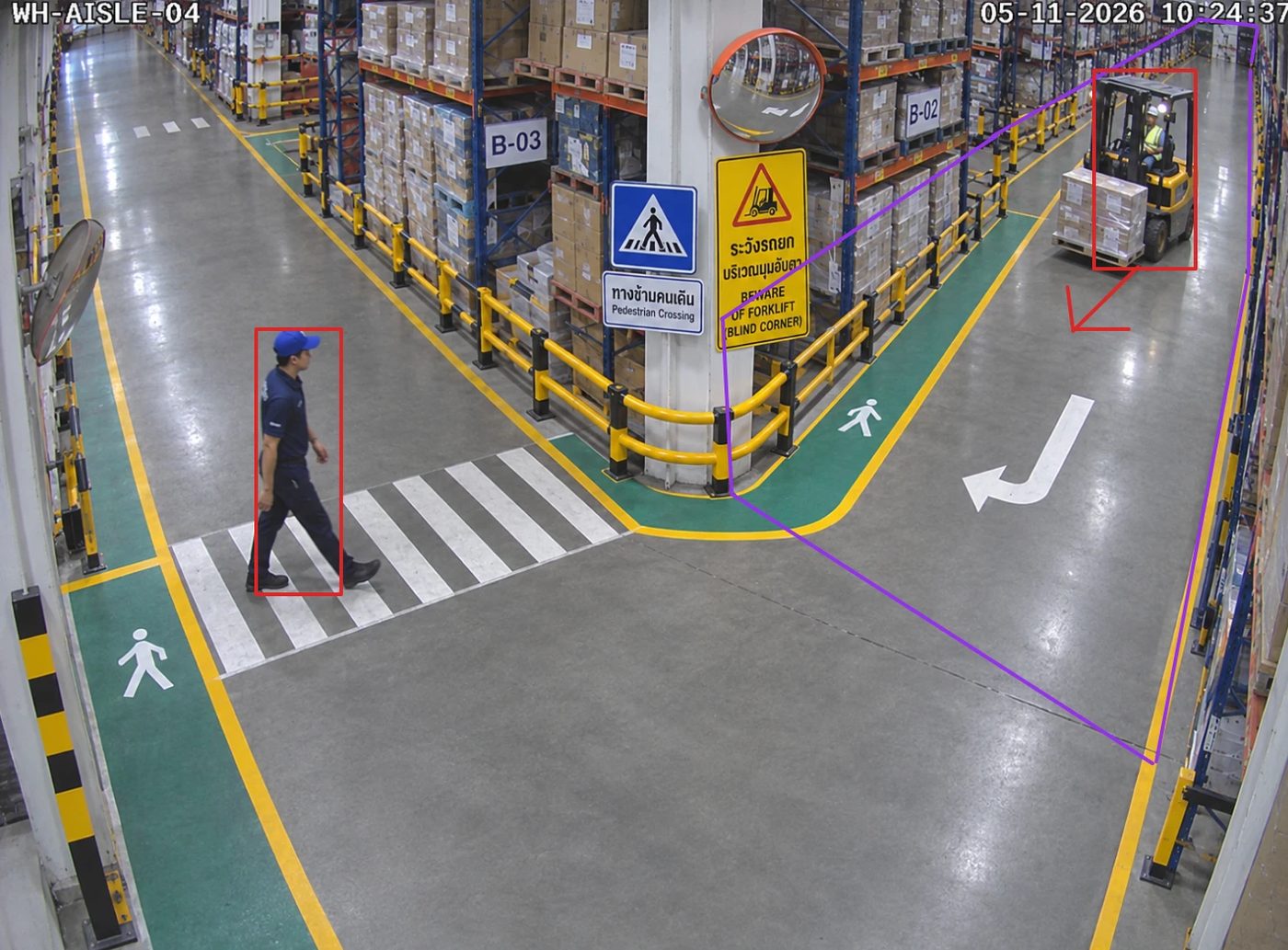
The cameras are there. Nobody can watch them all the time.
People can watch one spot at a time
Large production areas and dozens of cameras, yet an operator can follow only a few screens at once.
Incidents happen when nobody is looking
Safety risks or abnormal machine stops are usually found only after they have already happened.
Reviewing footage takes hours
To find a cause, teams scrub through footage hour by hour. It is slow and incomplete.
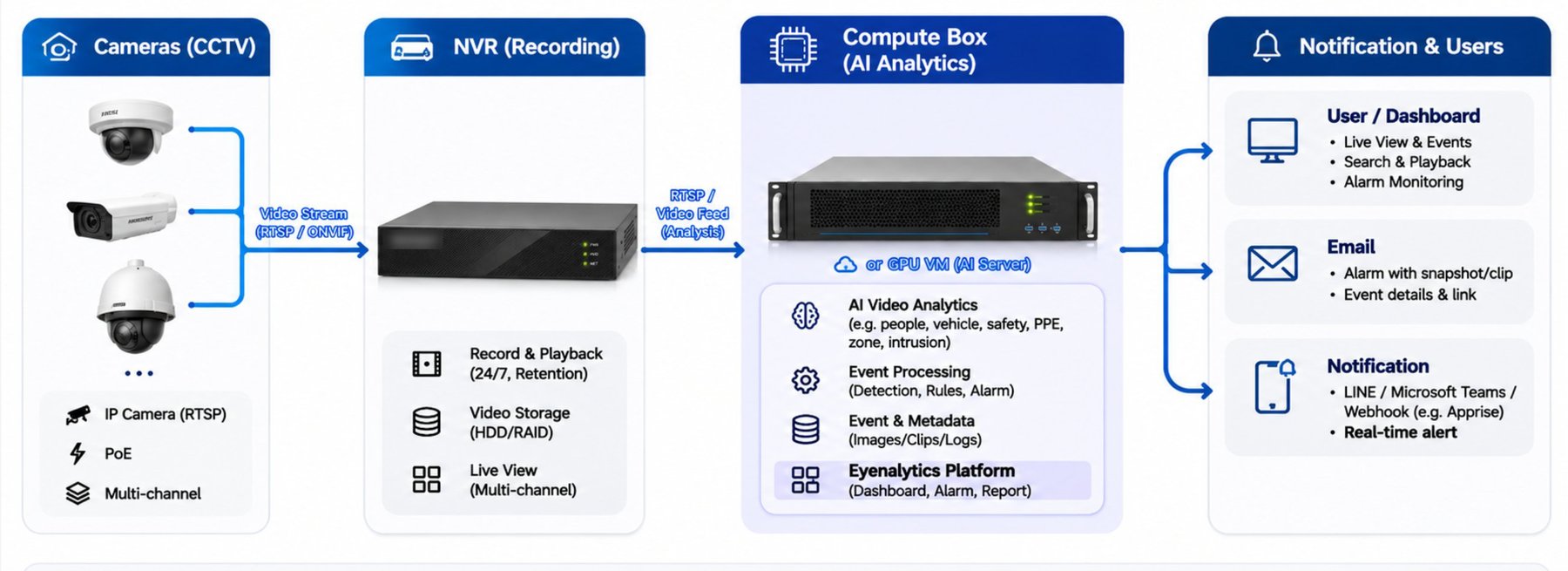
Eyenalytics makes the cameras you already have alert you when they see something you need to know.
From camera image to an alert you can act on
Existing CCTV
IP or analog cameras from any manufacturer.
Compute Box
An on-site processing unit. Video never leaves your premises.
AI analysis
Detects people and objects, tracks movement, and checks whether they enter a defined zone.
Result
Alarm to light/buzzer or PLC, dashboard, and daily report.
Everything runs on your factory network (on-premise) with no video sent to the cloud.
Built specifically for factory monitoring
People & object tracking
Follows movement and can calculate the speed of objects.
Zone detection
Draw restricted or controlled areas on the camera image and get alerted when someone enters.
Multi-level alarms
Levels such as OFF / WARN, with delay and minimum confidence to reduce false alarms.
Acknowledge
The responsible person acknowledges, and the alert changes with its status.
PLC connection
Write a tag or send a pulse to Mitsubishi, Siemens and Modbus TCP devices.
Dashboard & reports
Alarm history, incident statistics and a daily report by email.
Real frames from real factory cameras
Every image below comes from cameras in an operating factory. The colored boxes are what the AI detects.
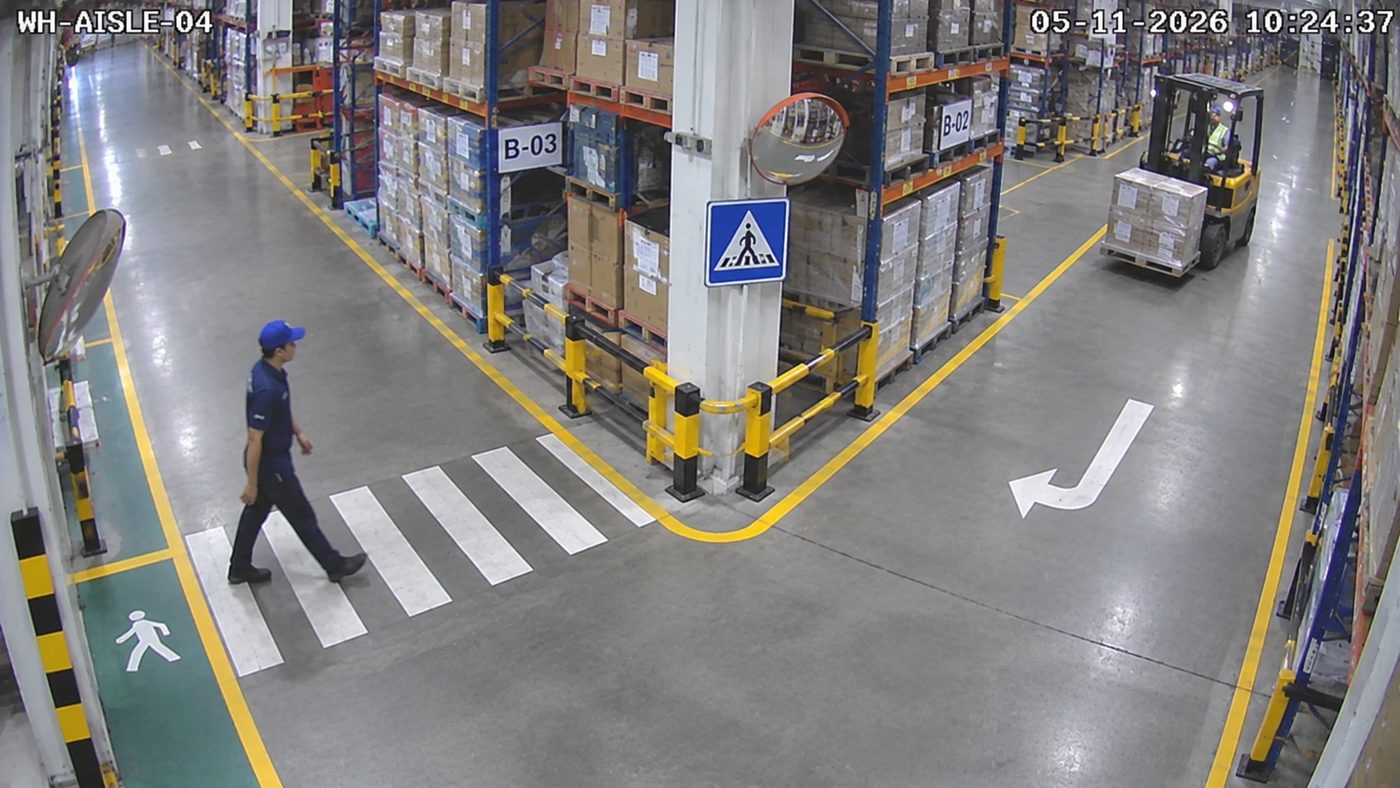
WH-AISLE-04: the danger zone at the blind corner (purple line). Red boxes are the detected person and forklift.
Know instantly when someone enters a danger area
Common situation
Areas around machines and forklift routes where people walk through without realizing they are in a danger zone.
How Eyenalytics helps
- Draw danger zones directly on the camera image
- Raise an alarm by severity level when someone enters
- Signal a warning light or buzzer through a PLC
- Record every event with a timestamp for later review
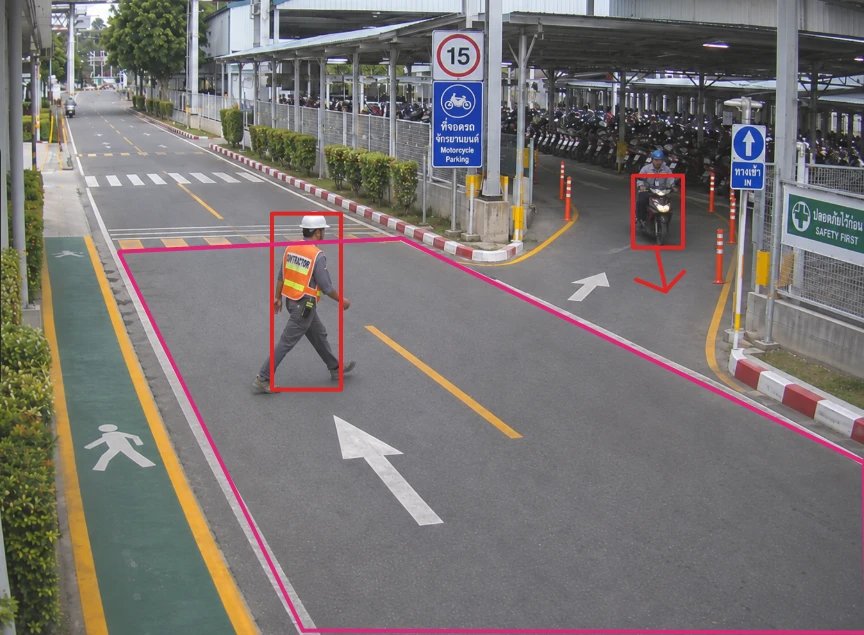
Internal road: a pedestrian walking on the road outside the crosswalk, and a motorcycle riding against the traffic direction (red boxes). The pink line marks the monitored zone.
Speed and crosswalk compliance on internal roads
Common situation
Vehicles speeding or riding the wrong way, and people not using the crosswalk, all hard to catch without someone standing watch.
How Eyenalytics helps
- Track vehicles, calculate speed and alert on Over Speed
- Detect Crosswalk Violations
- Detect vehicles moving against the traffic direction (wrong way)
- Keep a snapshot and clip of each event to coach drivers
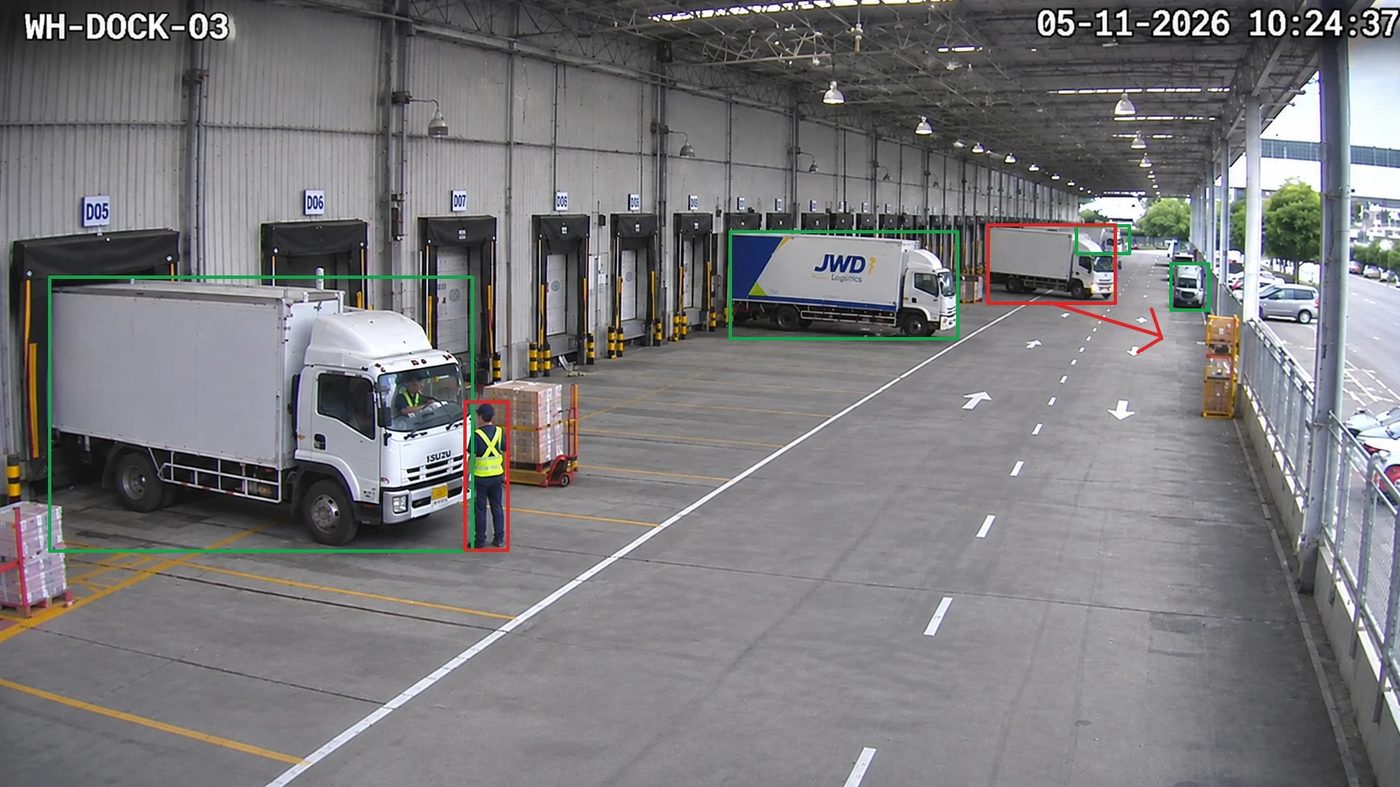
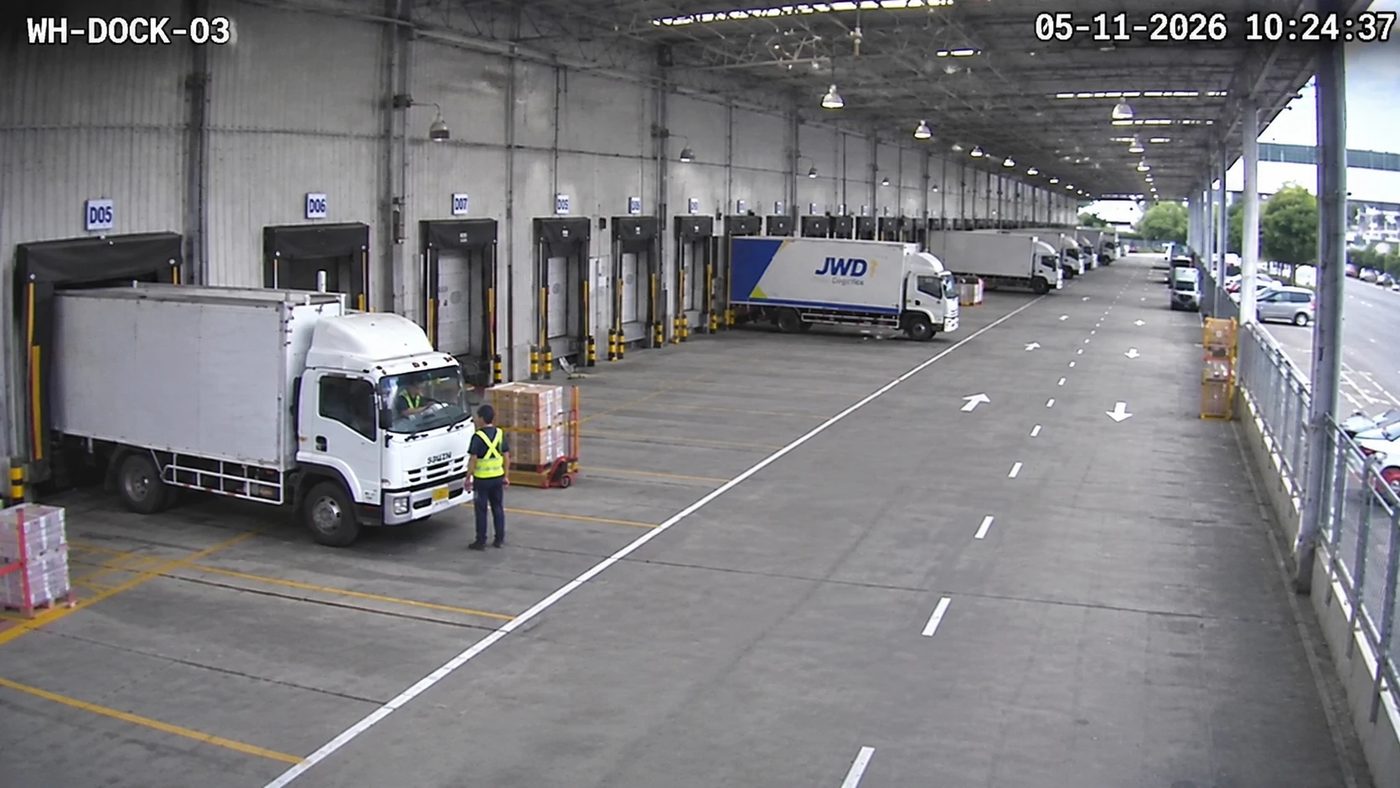
WH-DOCK-03: green boxes are parked vehicles; red marks the person and the moving truck, with an arrow for its direction.
A truck is moving and someone is standing in its path
Common situation
Trucks enter or leave the dock while staff stand or walk along the same path.
How Eyenalytics helps
- Detect vehicles and people in the same view and track their movement
- Define a zone in front of each dock and alert when someone is inside while a vehicle moves
- Trigger a light or buzzer through PLC by alarm level
- Record video and time for later review
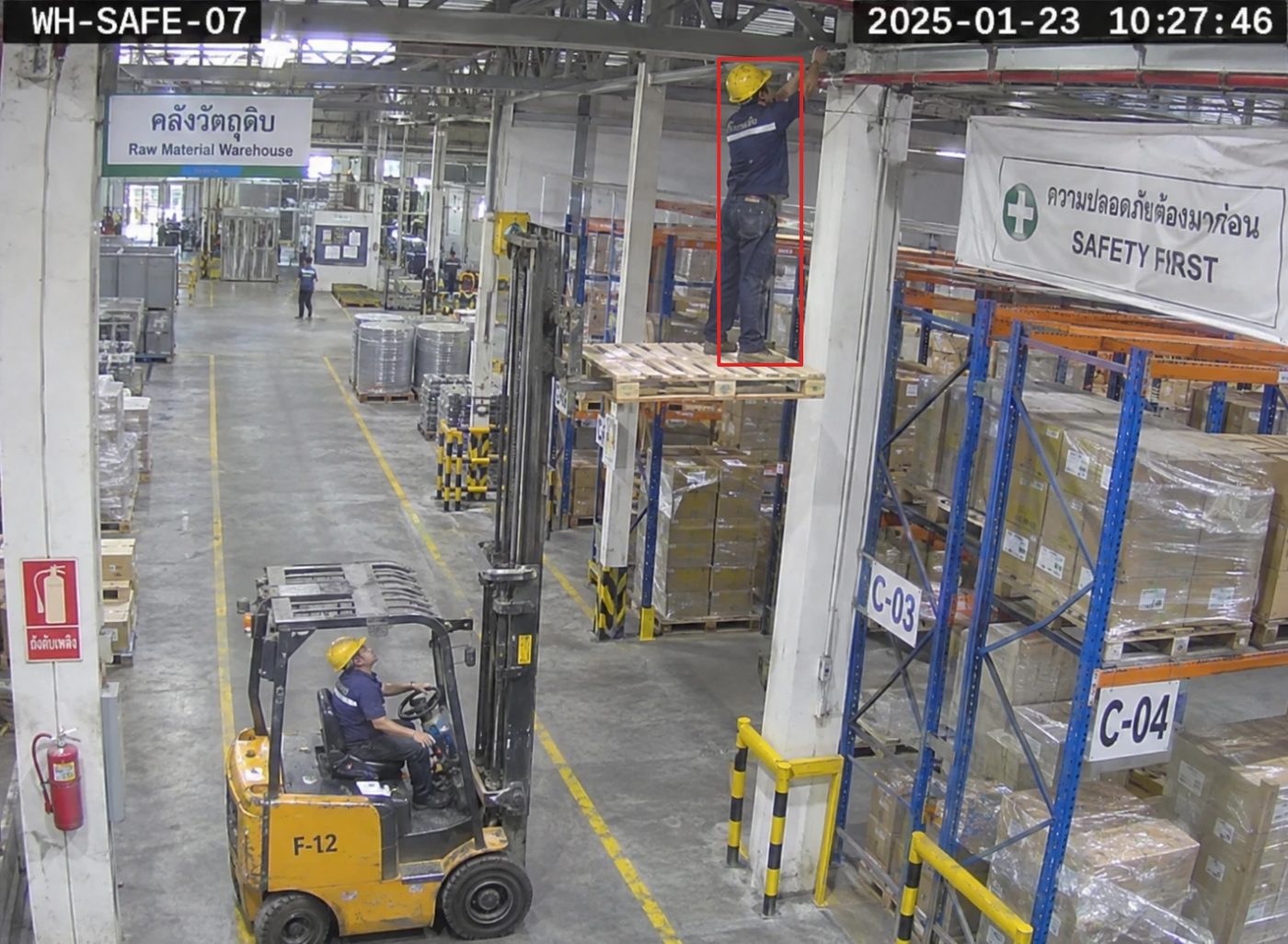
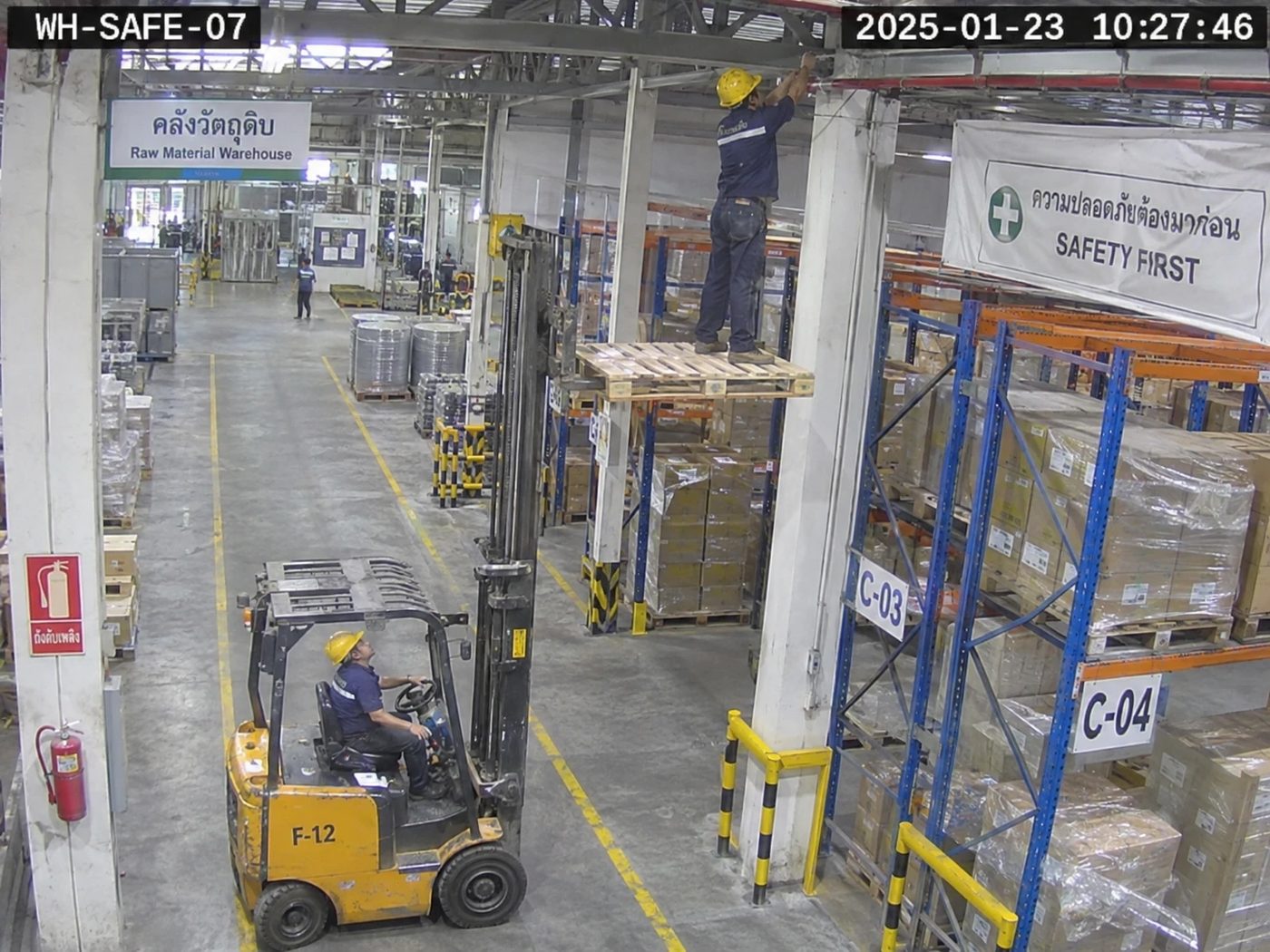
Real warehouse example: a worker standing on a raised pallet (not on the forklift itself) beside a working truck.
A person on a forklift: risky behavior that must be seen at once
Common situation
Staff standing on the forks or frame while the truck moves or lifts, with a risk of falls and crush injuries.
Eyenalytics approach
- Detect the forklift and people in the same view
- Alert when a person overlaps the truck while it is moving
- Sound a light or buzzer and keep the video for review
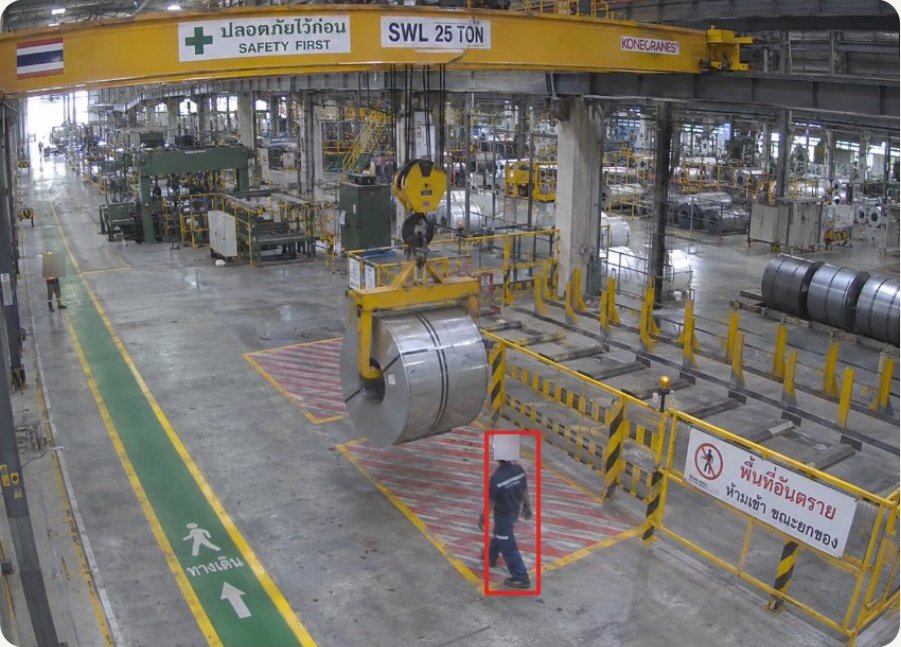
Site example: a person walking in the danger zone under a crane load (the red box is the detection).
Link what the camera sees to machine control
Example: a person walks under a lifted load. The camera flags it, a stop signal goes to the crane PLC, and the supervisor is notified to check.
Supported PLCs
Mitsubishi · Siemens · Allen Bradley · Modbus TCP · OPC
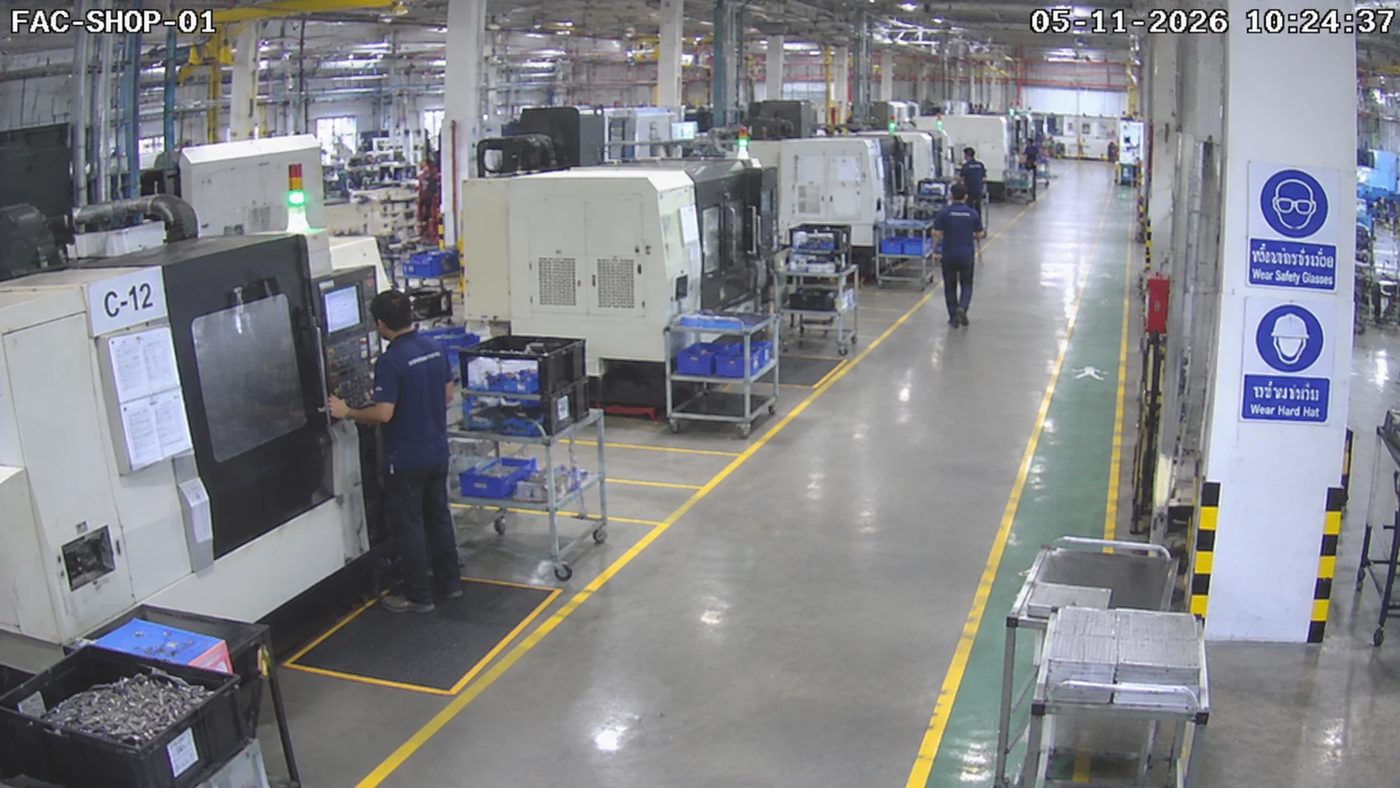
FAC-SHOP-01: a machining line where operators step in when something goes wrong.
MTBI: see how often someone has to step in
MTBI (Mean Time Between Intervention) is the average time between interventions on a machine or process. The higher it is, the longer production runs uninterrupted.
What the system records
- Every event with a timestamp and alarm level
- Counts per level and status history over time
- Repeat hotspots are a signal to improve the process
Calculation
MTBI = total running time ÷ number of interventions
You decide which alarm types count as an “intervention”, so the metric matches your factory’s definition.
Real factory data: map, history and summary in one place
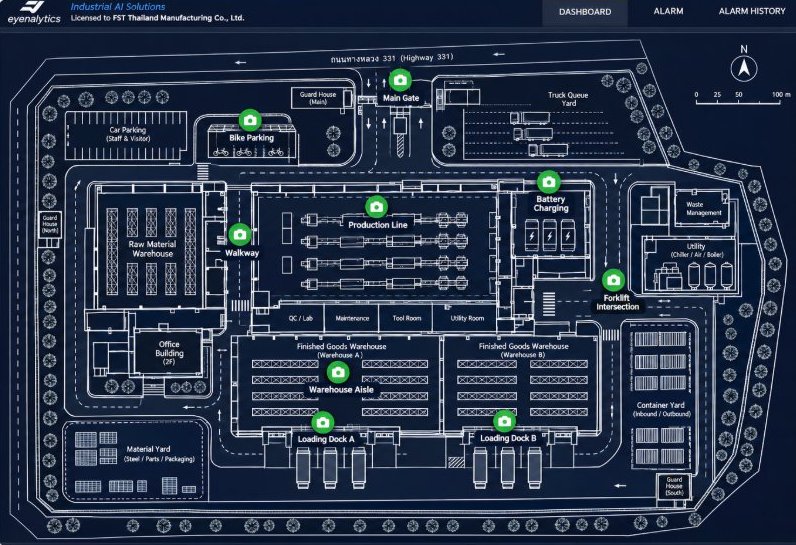
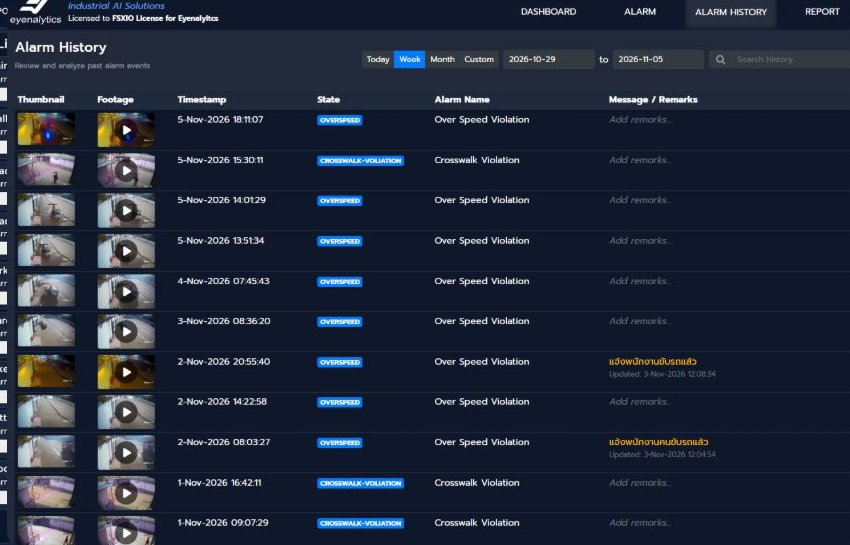
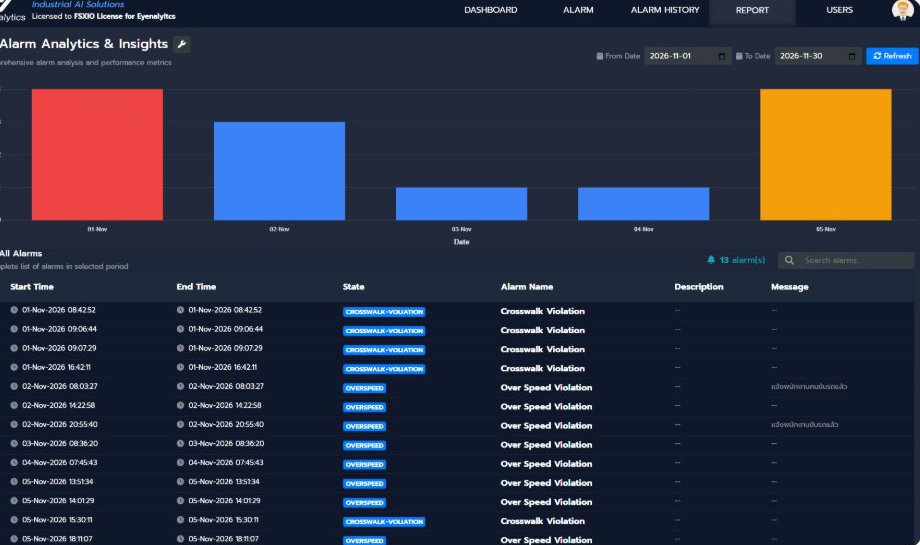
Real example, 1–5 Nov 2026: 13 events on internal roads, with notes recording that the driver was informed.
Over Speed ×8Crosswalk Violation ×5
Installs on your existing infrastructure. Your data stays on site.
Keep your cameras and NVR. Eyenalytics only adds the analysis and notification layer.
Cameras
Reuse existing CCTV, IP or analog.
Compute Box
An industrial unit installed on site. No cloud needed.
PLC
Modbus TCP plus Mitsubishi and Siemens drivers.
Data
Images and alarm history are stored on a machine inside the factory.
Notify through the channels you already use
Dashboard, email with snapshot or clip, LINE, Microsoft Teams and webhooks.
What IT and OT should assess together
Separating the camera and PLC networks from the office network, access rights, and backup and update procedures.
Priced by box and use case, not by number of cameras
Start with one site and grow from there. Request a quote based on your areas and use cases.
Compute Box
- Eyenalytics license and hardware included
- Ryzen 7 · GPU 4608 CUDA cores · 16GB VRAM · SSD 512GB
- No camera limit; works well with about 8–12 cameras (frame rate drops with more)
Edge AI Box
- Eyenalytics license included
- NVIDIA Jetson · Storage 64GB
- Supports 1–2 cameras · PLC-ready · DIN-rail mount
Per use case
- Includes training, setup, verification and support
- One use case can cover several cameras, depending on configuration
- Price depends on case complexity
Additional IP cameras, installation and NVR are not included. A 1-year warranty is included, followed by an annual maintenance fee. All pricing is indicative and not a formal quotation.
Start with one spot, measure the result, then scale
Choose the pilot spot
The single highest-risk area, or the machine that stops most often.
Install and define zones
Install the Compute Box and set zones and alarm levels with the production team.
Trial PLC link
Kept separate from the machine’s main interlock, with OT approval.
Measure and review
Compare MTBI before and after, alarm counts and verification results.
Timing is a preliminary proposal and should be confirmed after a joint assessment of the area and network readiness.
Good to know before you decide
A supplementary system, not a safety function
Eyenalytics extends your monitoring but does not replace certified safety systems.
Accuracy is measured on your own footage
Some use cases, such as forklift safety, are still in testing. Sample video from your site is collected before live use.
Agree on definitions before measuring
Metrics such as MTBI need a shared definition and report format with production from the start.
Make a decision today
- 1Consider piloting Eyenalytics in your single highest-risk area before scaling.
- 2Name a coordinator from production together with IT/OT.
- 3Agree on success metrics together before installation starts.
The same system helps with safety first, then becomes the data foundation for efficiency.